Thursday, 27 January 2011
ENOTERRA: Quinta do Correio Bº 2009
ENOTERRA: Quinta do Correio Bº 2009: "Na Quinta dos Roques são também produzidos os vinhos da marca Quinta do Correio. Estes estão quase ao nível dos primeiros, contudo, apres..."


Wednesday, 26 January 2011
Tuesday, 25 January 2011
ENOTERRA: Quinta dos Roques Encruzado 2009
ENOTERRA: Quinta dos Roques Encruzado 2009: "Quinta dos Roques Encruzado 2009. 100% Encruzado, esta é uma referência incontornável do Dão. A sua vinificação decorreu em cubas de inox, tendo parte do lote fermentado em barricas de carvalho francês, nas quais permaneceu por mais ...
ENOTERRA - http://enoterra.blogspot.com/"
ENOTERRA - http://enoterra.blogspot.com/"
Sunday, 23 January 2011
ENOTERRA: Quinta dos Roques Bº 2009
ENOTERRA: Quinta dos Roques Bº 2009: "Este Quinta dos Roques é feito à base de Encruzado, Malvasia Fina, Bical e Cercial. Provenientes de vinhas velhas, os cachos sofreram desengace, seguindo- se uma prensagem suave em prensa de repisa automática. Após a separação do mosto , ...
ENOTERRA - http://enoterra.blogspot.com/"
ENOTERRA - http://enoterra.blogspot.com/"
Sunday, 10 October 2010
Sunday, 26 September 2010
Friday, 27 August 2010
Create A Full System Backup Or Custom Live Ubuntu / Debian CD With Remastersys
Create A Full System Backup Or Custom Live Ubuntu / Debian CD With Remastersys: "
This was a tip sent by WebUpd8 reader Saurabhneo23:
Do not replace 'karmic' with 'lucid' or other Ubuntu version name!
For older Ubuntu versions and Debian, see the Remastersys website.

See also:


 "
"
I realize many of you probably already know Remastersys, but we decided to make a post on it anyway because it's an amazing tool and maybe some of you never heard of it.
It's one of the best tools out there to make a disaster recovery disc or make an ISO of your own customized Ubuntu. It's an equivalent to Windows backup and restore (if you use it only for system recovery and not to recover your personal files).
Remastersys is a tool which can be used to create a custom live Ubuntu / Debian CD. But it's not like the other such tools we've already covered as it can be used to clone your current installation which you can then use to either share it with your friends or create your own Ubuntu derivate. Don't worry about your private data and such, that's not going to be included onto the CD.
But that's not all there is to Remastersys: you can also use it for a full system backup onto an installable CD, DVD or USB drive - this will also include your personal data and you can later use it like any live CD/USB to reinstall your whole system and data.
To install Remastersys in Ubuntu Karmic and newer, run the following commands:
sudo add-apt-repository 'deb http://www.geekconnection.org/remastersys/repository karmic/'
sudo apt-get update
sudo apt-get install remastersys
Do not replace 'karmic' with 'lucid' or other Ubuntu version name!
For older Ubuntu versions and Debian, see the Remastersys website.
Once installed, you can access Remastersys by going to System > Administration > Remastersys Backup. Then, all the options are one click away:
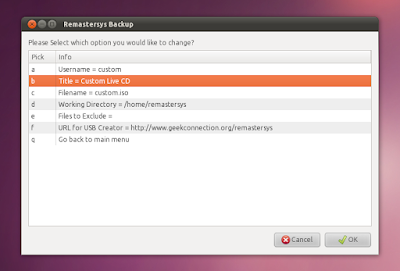
Click on 'Modify' to set the Live CD username (it must be in lowercase!), the Live CD title, filename and so on:
When you're finished with customizing these settings (or you can use the default values), select 'Go back to the main menu' and select what you want to do: Backup the full system (including personal data), make a distributable copy and so on and then wait for your ISO to be built.
For more info, visit Remastersys homepage.
See also:
- Reconstructor - Ubuntu / Debian web custom Live CD creator
- Easily Create A Custom Ubuntu Live CD With Ubuntu Customization Kit (UCK)
Thanks to Saurabhneo23 for the suggestion to make a post on Remastersys Backup!

 "
"
Tuesday, 24 August 2010
Wally (Automatic Wallpaper Changer) 2.4 Adds deviantArt, Vladstudio And Google Image Sources
Wally (Automatic Wallpaper Changer) 2.4 Adds deviantArt, Vladstudio And Google Image Sources: "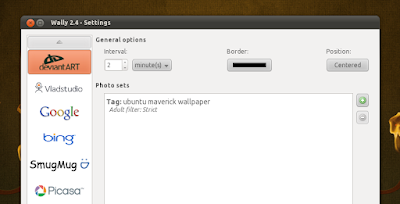
See also:


 "
"
Wally is an automatic wallpaper changer for Windows, Linux and Mac OSX which uses many sources for getting the images: local folders, Flickr, Yahoo!, Panoramio, Pikeo, Ipernity, Photobucket, Buzznet, Picasa, Bing and Smugmug images.
What exactly does that mean? Well, you can enter a keyword for Wally to search Google, Flickr, Bing or whatever and Wally will automatically download the images it finds and sets them as your wallpaper - either automatically (every X seconds) or you can manually change it by right clicking the Wally icon in the notification area. You can also tweak lots of settings regarding the images you want Wally to download, like: only use landscape oriented photos, photo has to be bigger than the desktop size and the wallpaper position.
A new Wally version - 2.4 - has been recently released, featuring new modules for fetching the wallpapers: Google, deviantArt and Vladstudio. Besides the new modules, Wally 2.4 also adds more photo layouts, Snow Leopard support and fixes quite a few bugs.
Download Wally 2.4 (download links include Ubuntu / Debian .deb files, Windows .exe and Mac OSX .dmg files)
See also:
- Install Webilder 0.6.7 In Ubuntu (Finally Working Again With WebShots)
- CreBS Creates Background Slideshows In Seconds
- Install Wallpaper Clocks In Ubuntu Linux
[thanks to Ubuntips for the news!]
 "
"
Subscribe to:
Posts (Atom)